✅
Earbuds Battery Life by Brand • Battery Life Comparison of Major Earbuds Brands • Best Battery Life Earbuds from Each Brand✅
Earbuds Battery Draining Fast • Normal Battery Aging • Abnormal Battery Drain • Tips to Save Earbuds Battery Power✅
How to Replace an Earbuds Battery • How to Open Earbuds for Battery Replacement • Earbuds Battery Types • Checking the Battery Size, Voltage and Capacity✅
How to Check Earbuds Battery Level on Your Phone • Checking Earbuds Battery on iPhone • Checking Earbuds Battery on Android✅
Conclusion✅
FAQ How to Check Earbuds Battery on iPhone? How to Fix One Earbud Battery Draining Fast? How Long Do Apple Earbuds Batteries Last? How to Make Earbuds Battery Last Longer? How to Check Battery Level?Earbuds rely on compact batteries to deliver hours of wireless listening in a very limited space. Most modern models use small rechargeable lithium cells, with battery life affected by capacity, voltage, usage, charging habits, and aging. This page covers earbuds battery life, replacement, battery checking, fast draining, and power-saving tips.
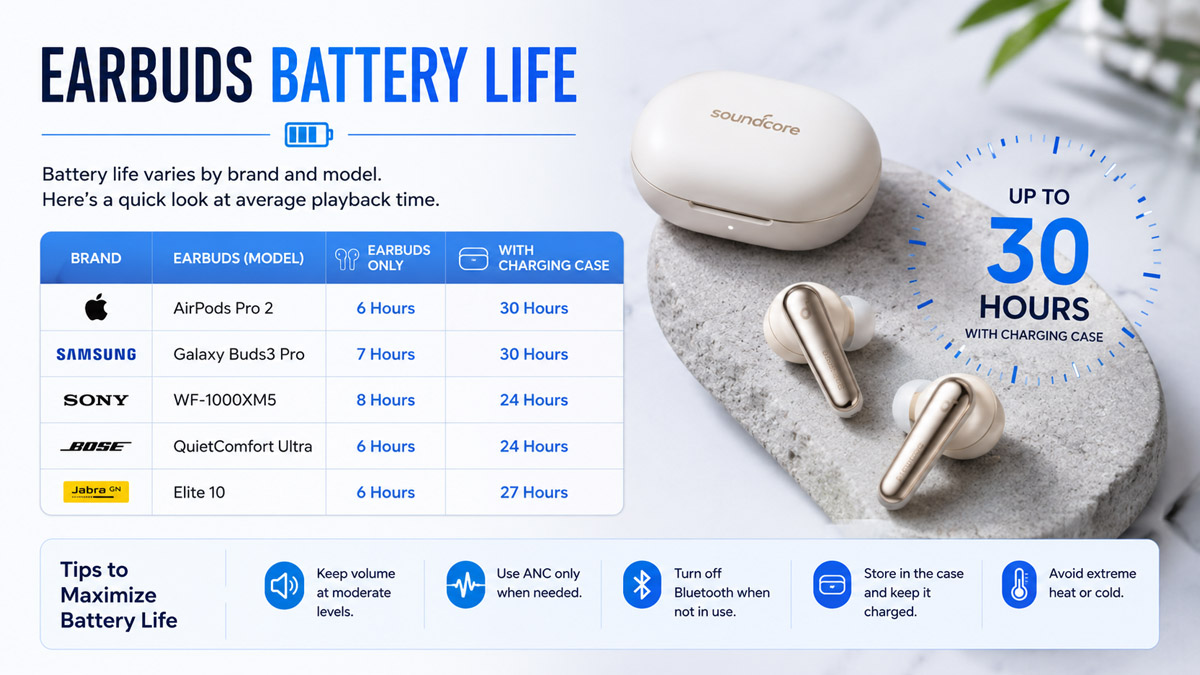 Earbuds Battery Life by Brand
Earbuds battery life varies by brand, model, ANC use, volume, and other features. Most modern wireless earbuds provide about 5–12 hours of listening on one charge, while the charging case can extend total listening time considerably.
• Battery Life Comparison of Major Earbuds Brands
| Brand |
Representative Earbuds |
Battery Life per Charge |
Total Battery Life with Case |
Conditions |
| Apple |
AirPods Pro 3 |
Up to 8 hours |
Up to 24 hours |
ANC on |
| Samsung |
Galaxy Buds4 Pro |
Up to 7 hours |
Up to 30 hours |
ANC off |
| Sony |
WF-C710N |
Up to 12 hours |
Up to 40 hours |
ANC off |
| Bose |
QuietComfort Earbuds |
Up to 8.5 hours |
Up to 30 hours |
Standard listening |
| JBL |
Live Beam 3 |
Up to 12 hours |
Up to 48 hours |
ANC off |
| JLab |
JBuds Pods ANC |
10+ hours |
56+ hours |
ANC off |
| Raycon |
Fitness Earbuds |
About 12 hours |
About 56 hours |
ANC off |
| Skullcandy |
Method 360 ANC |
Up to 11 hours |
Up to 40 hours |
ANC off |
| Beats |
Studio Buds + |
Up to 9 hours |
Up to 36 hours |
ANC off |
| Soundcore |
Liberty 4 NC |
Up to 10 hours |
Up to 50 hours |
Standard mode |
These figures are manufacturer-rated maximum listening times. Actual earbud battery life is usually shorter when using high volume, active noise cancellation, calls, spatial audio, or other power-intensive features.
• Best Battery Life Earbuds from Each Brand
For a more consistent comparison, the models below are selected mainly by maximum advertised total listening time with the charging case, with ANC switched off where applicable.
| Brand |
Long-Battery-Life Model |
Earbuds per Charge |
Total with Case |
| Apple |
AirPods 4 |
Up to 5 hours |
Up to 30 hours |
| Samsung |
Galaxy Buds4 Pro |
Up to 7 hours |
Up to 30 hours |
| Sony |
WF-C710N |
Up to 12 hours |
Up to 40 hours |
| Bose |
QuietComfort Earbuds |
Up to 8.5 hours |
Up to 30 hours |
| JBL |
Live Beam 3 |
Up to 12 hours |
Up to 48 hours |
| JLab |
Epic Pods ANC |
16+ hours |
60+ hours |
| Raycon |
Fitness Earbuds |
About 12 hours |
About 56 hours |
| Skullcandy |
Push ANC Active |
Up to 12 hours |
Up to 58 hours |
| Beats |
Powerbeats Pro 2 |
Up to 10 hours |
Up to 45 hours |
| Soundcore |
P40i |
Up to 12 hours |
Up to 60 hours |
Among these models, JLab Epic Pods ANC and Soundcore P40i offer some of the longest total battery life at around 60 hours, while Beats Solo Buds are also notable for providing up to 18 hours from the earbuds themselves, although their case does not contain a battery for additional charging.
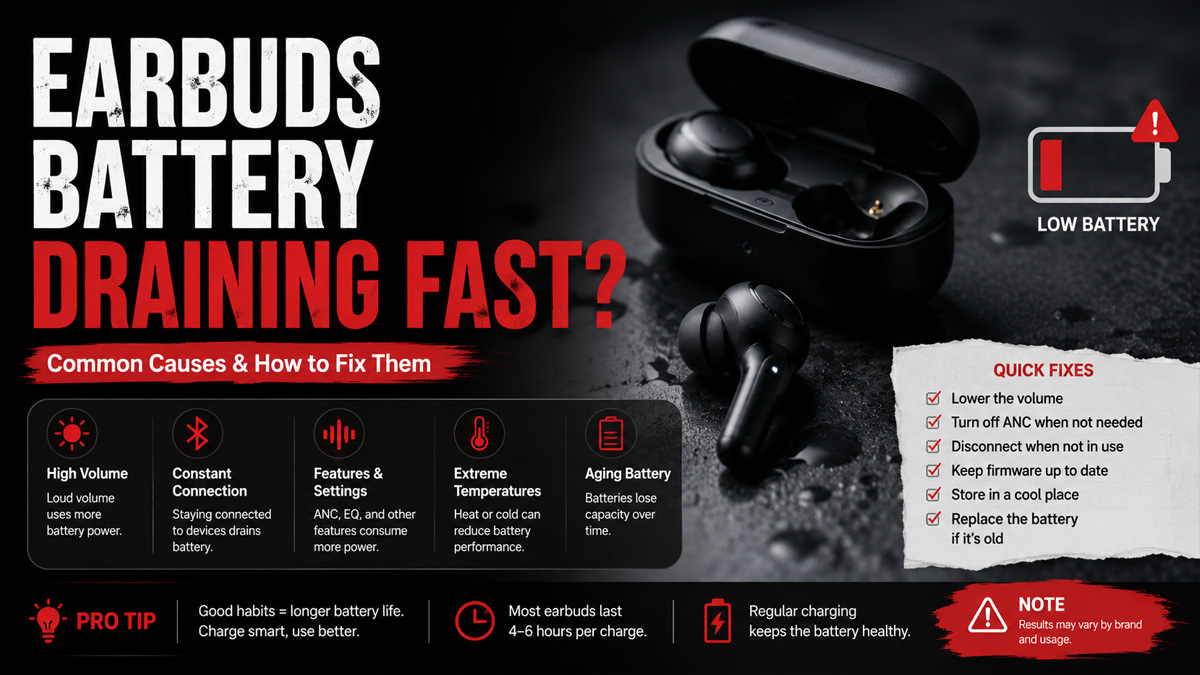
Earbuds Battery Draining FastFast battery drain does not always mean the earbuds are faulty. In most cases, it comes from either normal battery aging or abnormal power consumption.
• Normal Battery Aging
Earbuds use small lithium-ion or lithium-polymer batteries that gradually lose capacity with charge cycles and time. As the battery ages, the earbuds may still charge to 100%, but the actual amount of energy they can store becomes lower.
Common signs of normal aging include:
- Battery life gradually becoming shorter over months or years.
- Both left and right earbuds losing runtime at a similar rate.
- The battery percentage dropping faster than when the earbuds were new.
- Earbuds still working normally but requiring more frequent charging.
Battery aging cannot be reversed through software or charging methods. If runtime becomes too short for normal use, battery replacement or replacing the earbuds is the practical solution.
• Abnormal Battery Drain
Abnormal drain usually appears suddenly or affects one earbud much more than the other. It may be caused by software, connection problems, charging issues, or unusually high power consumption.
Common causes include:
- ANC or transparency mode running continuously.
- High listening volume.
- Frequent phone calls or microphone use.
- Bluetooth connection instability.
- Firmware or software problems.
- One earbud remaining active inside the charging case.
- Dirty charging contacts preventing a full charge.
- Battery calibration or battery percentage reporting errors.
- A damaged or defective battery.
- Fixing Abnormal Earbuds Battery Drain
Try these steps before considering battery replacement:
- Fully charge both earbuds and the charging case.
- Clean the charging contacts on the earbuds and case.
- Restart or reset the earbuds.
- Forget the Bluetooth device and pair it again.
- Update the earbuds firmware if an update is available.
- Compare the battery drain of the left and right earbuds.
- Turn off ANC, transparency mode, spatial audio, and other unnecessary features for testing.
- Check whether the earbuds are actually disconnecting and charging when placed in the case.
If one earbud continues to drain much faster after these checks, the battery or charging circuit may be faulty.
• Tips to Save Earbuds Battery Power
To extend battery life between charges:
- Use moderate listening volume.
- Turn off ANC or transparency mode when they are not needed.
- Disable unnecessary voice assistant or spatial audio features.
- Keep Bluetooth connections stable and avoid excessive reconnecting.
- Return the earbuds to the charging case when not in use.
- Keep charging contacts clean.
- Avoid exposing the earbuds to high temperatures.
- Do not leave the battery completely discharged for long periods.
Power-saving settings can improve daily runtime, but they cannot restore capacity already lost through normal battery aging.
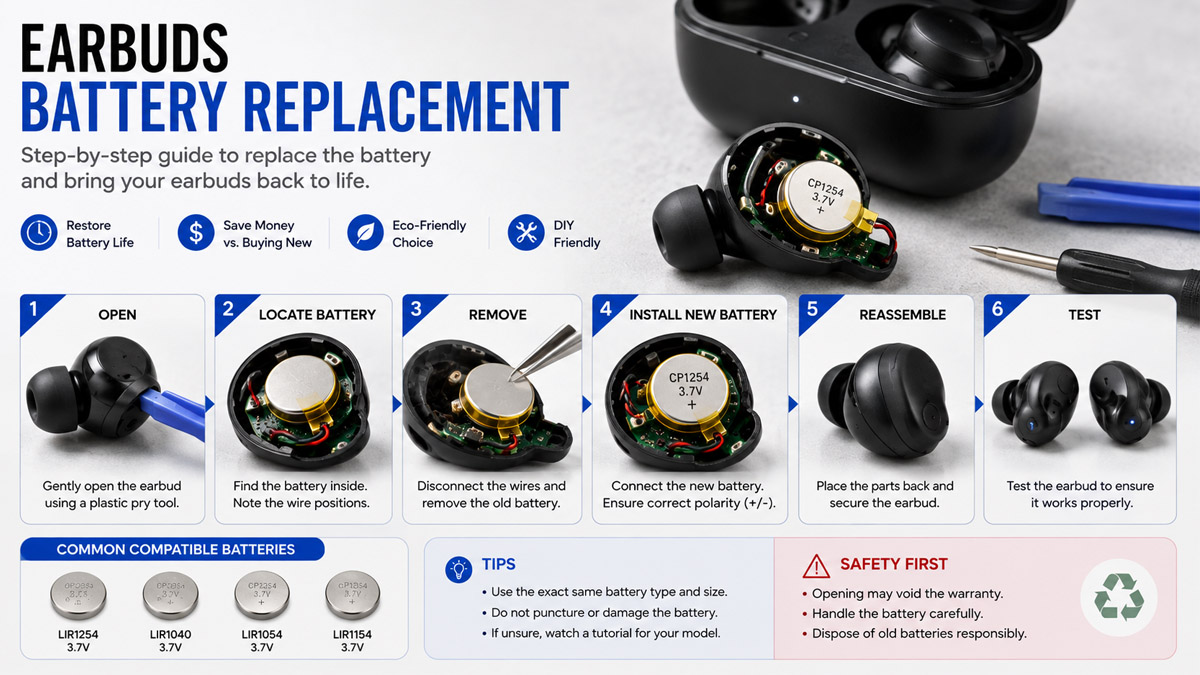
How to Replace an Earbuds BatteryReplacing an earbuds battery requires opening the earbud housing, identifying the original battery type, and matching its physical and electrical specifications. Because earbuds are compact and often glued together, careful disassembly is important to avoid damaging the shell, wires, speaker, or circuit board.
• How to Open Earbuds for Battery Replacement
Most wireless earbuds do not use screws alone. Their housings are often held together with clips, adhesive, or ultrasonic welding.
To open an earbud:
- Turn off the earbuds and remove them from the charging case.
- Locate the seam between the two parts of the earbud housing.
- Gently heat the seam if adhesive is used.
- Use a thin plastic opening tool to separate the housing.
- Open the shell slowly because the battery may be connected to the circuit board with short wires.
Avoid using excessive force or sharp metal tools near the battery. A punctured lithium battery can overheat, swell, or catch fire.
• Earbuds Battery Types
Most modern wireless earbuds use small rechargeable lithium batteries. The two most common designs are:
- Lithium-polymer pouch batteries: Flat or custom-shaped cells commonly used when the internal space is irregular.
- Rechargeable lithium button batteries: Small round cells commonly used in compact true wireless earbuds.
The replacement battery should normally use the same battery type and structure as the original. Do not replace a pouch cell with a button cell simply because the capacity is similar.
• Checking the Battery Size, Voltage and Capacity
After opening the earbud housing, you can usually find the main battery specifications printed directly on the battery body. Before choosing a replacement, check the battery type or shape, physical dimensions, voltage, and capacity.
| Specification |
What You May See on the Battery |
What It Means |
| Battery Type / Size |
LiPo pouch cell or rechargeable lithium button cell |
Earbuds commonly use either a small flat LiPo pouch battery or a compact round button-style lithium battery. For pouch cells, measure length × width × thickness. For button cells, check diameter × height. |
| Voltage |
3.7V, 3.8V, 3.85V, etc. |
This is the nominal operating voltage of the cell. A replacement battery should use the same or a compatible voltage specified for the original earbud charging circuit. |
| Capacity |
40mAh, 60mAh, 100mAh, 200mAh, etc. |
Capacity indicates how much electrical energy the battery can store. Because earbuds have very limited internal space, their batteries are usually small-capacity cells. |
| Model / Cell Code |
A printed number or battery model code |
The code may identify the battery dimensions, manufacturer, or cell series and can help when searching for a replacement. |
Physical size is especially important. A replacement battery may have the correct voltage and capacity but still be unusable if it is slightly too thick or too wide to fit inside the earbud housing.
Capacity should also not be increased blindly. A higher-mAh battery is only suitable when its size, voltage, battery type, wiring, and charging requirements are compatible with the original cell.
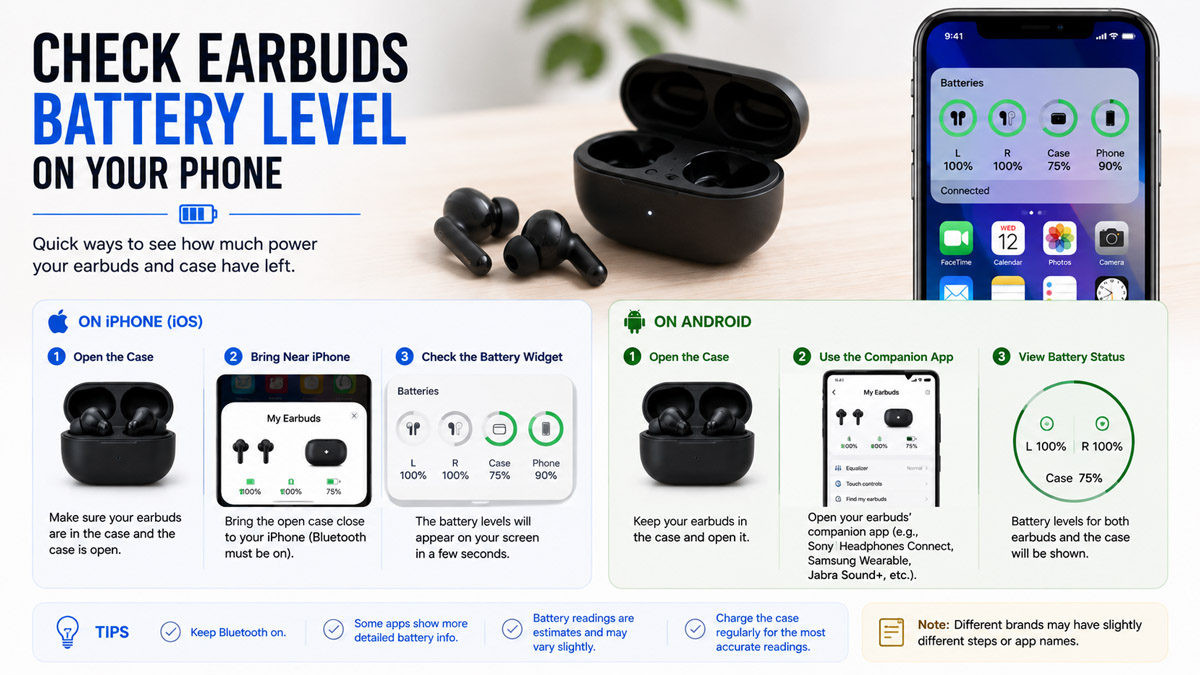
How to Check Earbuds Battery Level on Your PhoneMost Bluetooth earbuds can show their remaining battery level directly on a connected smartphone. The exact method depends on the phone and earbud model.
• Checking Earbuds Battery on iPhone
On an iPhone, you can usually check the battery level in several ways:
- Batteries widget: Add the Batteries widget to the Home Screen or Today View to see the battery percentage of connected earbuds.
- Bluetooth connection: Some earbuds display their battery level when connected through Bluetooth.
- AirPods charging case: For AirPods, open the charging case near the iPhone to see the battery levels of the left earbud, right earbud, and charging case.
- Manufacturer app: Some third-party earbuds provide more detailed battery information through their own iOS app.
For compatible earbuds, the Batteries widget is usually the easiest way to monitor battery level during daily use.
• Checking Earbuds Battery on Android
Android phones can also display the remaining battery level of most compatible Bluetooth earbuds.
- Open Settings > Bluetooth or Connected Devices.
- Find the connected earbuds in the device list.
- The remaining battery percentage may appear next to the device name or inside its device settings.
- Some Android phones also show the battery level in the Quick Settings panel or notification area.
- For earbuds from Samsung, Sony, JBL, JLab, Soundcore and other brands, the manufacturer's app may show separate battery levels for each earbud and the charging case.
The exact display can vary between Android phone brands and earbud models. If the battery percentage does not appear in the Bluetooth menu, checking the manufacturer's app is usually the next option.
ConclusionEarbuds battery performance depends on battery capacity, voltage, usage, features, and aging. Understanding battery life, checking the remaining charge, identifying abnormal drain, and matching the correct battery specifications can help keep earbuds working reliably. When replacement is needed, always confirm the battery type, size, voltage, and capacity before installing a new cell.
FAQHow to Check Earbuds Battery on iPhone?Connect the earbuds to your iPhone and check the Batteries widget on the Home Screen or Today View. For AirPods, you can also open the charging case near the iPhone to view the battery levels of the earbuds and charging case.
How to Fix One Earbud Battery Draining Fast?Fully charge both earbuds, clean the charging contacts, reset and reconnect the earbuds, and update the firmware if available. You can also turn off ANC, transparency mode, and other power-consuming features for testing. If one earbud still drains much faster, its battery or charging circuit may be faulty.
How Long Do Apple Earbuds Batteries Last?Based on the Apple models covered in this article, earbuds can provide about 5–8 hours of listening per charge, while the charging case can extend total battery life to about 24–30 hours, depending on the model and enabled features.
How to Make Earbuds Battery Last Longer?Use a moderate listening volume and turn off ANC, transparency mode, spatial audio, or other unnecessary features when they are not needed. Keep the Bluetooth connection stable, place the earbuds back in the charging case after use, keep the charging contacts clean, and avoid high temperatures.
How to Check Battery Level?Connect the earbuds to your phone and check the battery level in Bluetooth settings, the battery widget, notification area, or the manufacturer's app. The exact method depends on the phone and earbud model.
 Earbuds Battery Life by Brand


