✅ iPhone 14 Series Battery Specifications✅ iPhone 14 Series Battery Life
• iPhone 14 Series Battery Life Test Results • How to Extend iPhone 14 Battery Lifespan✅ Why the iPhone 14 Battery Drains Fast✅
iPhone 14 Battery Health Check✅
iPhone 14 Battery Replacement • Manual Replacement Steps • Professional Replacement Is Recommended✅
FAQ How Long Does the iPhone 14 Battery Last? Why Is My iPhone 14 Battery Draining So Fast? Can iPhone 14 Pro Battery Be Replaced? How Big Is iPhone 14 Battery? How Long Does the iPhone 14 Pro Max Battery Last?
The iPhone 14 series includes four models with different battery capacities, runtime, and performance characteristics. This article covers their specifications, battery life, health, replacement, fast-drain problems, overheating, swelling, and other common issues. For information covering more generations, see our
battery information across different iPhone models.
 iPhone 14 Series Battery Specifications
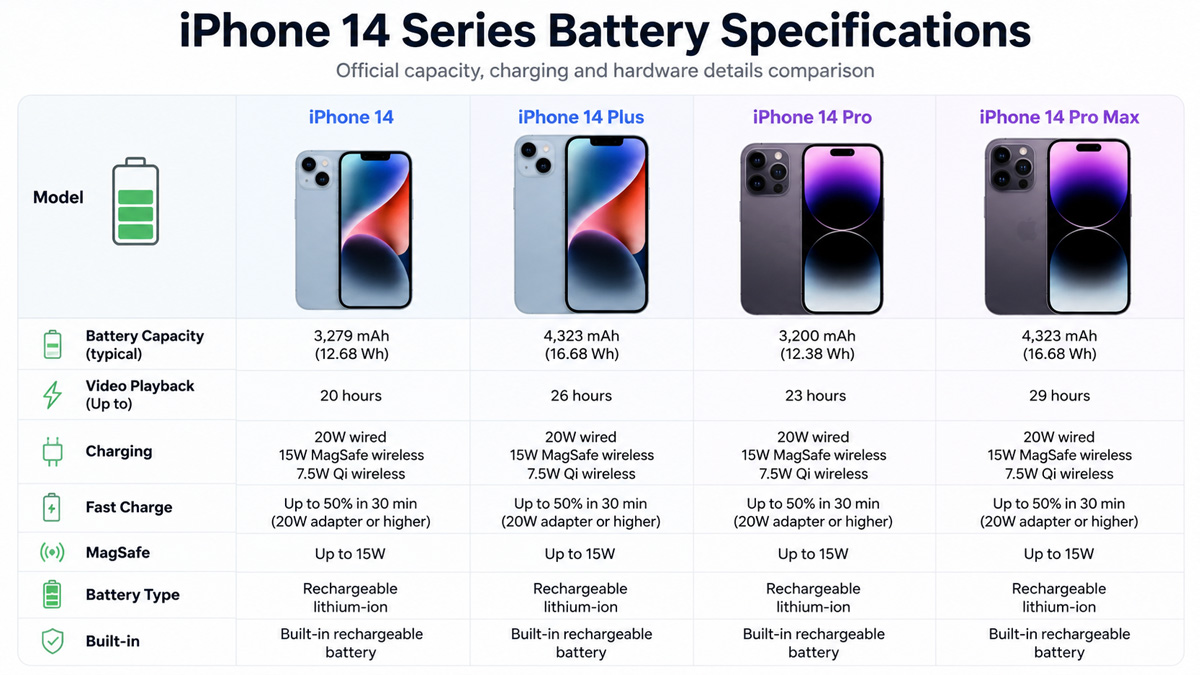
The iPhone 14 series includes four models, and their battery specifications vary mainly in capacity, energy, and voltage. The table below compares the key battery specifications of the iPhone 14, iPhone 14 Plus, iPhone 14 Pro, and iPhone 14 Pro Max.
| Specification |
iPhone 14 |
iPhone 14 Plus |
iPhone 14 Pro |
iPhone 14 Pro Max |
| Battery Capacity |
3,279 mAh |
4,325 mAh |
3,200 mAh |
4,323 mAh |
| Battery Energy |
12.68 Wh |
16.68 Wh |
12.38 Wh |
16.68 Wh |
| Nominal Voltage |
3.87 V |
3.86 V |
3.87 V |
3.86 V |
| Battery Type |
Rechargeable lithium-ion |
Rechargeable lithium-ion |
Rechargeable lithium-ion |
Rechargeable lithium-ion |
| MagSafe Charging |
Up to 15 W |
Up to 15 W |
Up to 15 W |
Up to 15 W |
| Qi Wireless Charging |
Up to 7.5 W |
Up to 7.5 W |
Up to 7.5 W |
Up to 7.5 W |
| Fast Charging |
Supported |
Supported |
Supported |
Supported |
| Recommended Fast-Charge Adapter |
20 W or higher |
20 W or higher |
20 W or higher |
20 W or higher |
The iPhone 14 Plus has the largest battery capacity in the series at 4,325 mAh, closely followed by the iPhone 14 Pro Max at 4,323 mAh. Interestingly, the iPhone 14 Pro has a slightly smaller battery than the standard iPhone 14, with 3,200 mAh compared with 3,279 mAh.
All four models use built-in rechargeable lithium-ion batteries. Their pouch-style construction is also commonly associated with LiPo batteries, which belong to the broader lithium-ion battery family. However, battery capacity alone does not determine how long an iPhone lasts on a charge.
iPhone 14 Series Battery Life
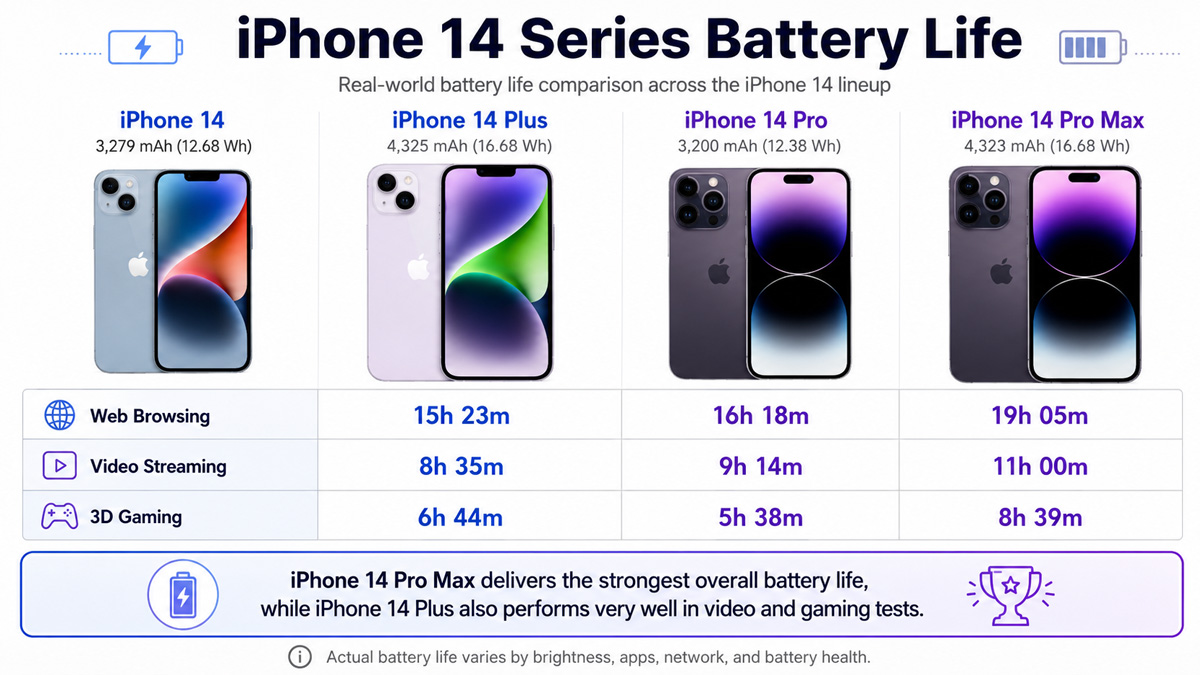
Battery capacity tells only part of the story. What most users care about is how long the phone can actually run during everyday activities such as browsing the web, watching videos, or playing games. The following results are based on controlled battery tests conducted by PhoneArena across all four iPhone 14 models.
• iPhone 14 Series Battery Life Test Results
| Model |
Web Browsing |
Video Streaming |
3D Gaming |
| iPhone 14 |
15h 23m |
8h 35m |
6h 44m |
| iPhone 14 Plus |
14h 51m |
10h 53m |
8h 18m |
| iPhone 14 Pro |
16h 18m |
9h 14m |
5h 38m |
| iPhone 14 Pro Max |
19h 05m |
11h 00m |
8h 39m |
The iPhone 14 Pro Max delivers the strongest overall battery life in these tests, lasting the longest in web browsing, video streaming, and gaming. The iPhone 14 Plus is also particularly strong for video playback and gaming, despite slightly trailing some smaller models in the browsing test.
These results also show why battery capacity alone cannot predict runtime. The iPhone 14 Plus and iPhone 14 Pro Max have almost identical battery capacities, yet their tested battery life is different because display characteristics, processor workload, refresh rate, network use, and software optimization all affect power consumption.
Actual battery life will also vary with screen brightness, signal strength, 5G use, background apps, temperature, battery health, and how heavily the phone is used.
• How to Extend iPhone 14 Battery Lifespan
The iPhone 14 uses a lithium-ion battery, and its long-term lifespan is mainly affected by heat, high state of charge, deep discharge, and charge-discharge stress. To slow battery aging, avoid leaving the phone in high-temperature environments, especially while charging, and try not to keep the battery at 100% for long periods every day. Frequent deep discharges to very low levels also increase stress on the battery, so keeping the charge level roughly between 20% and 80% when convenient can help reduce degradation.
Fast charging is safe when the phone manages temperature properly, but repeated high-power charging under hot conditions can accelerate chemical aging. Using Optimized Battery Charging, avoiding heavy gaming or other high-load tasks while charging, and keeping the phone cool are more effective for long-term battery health than simply charging less often.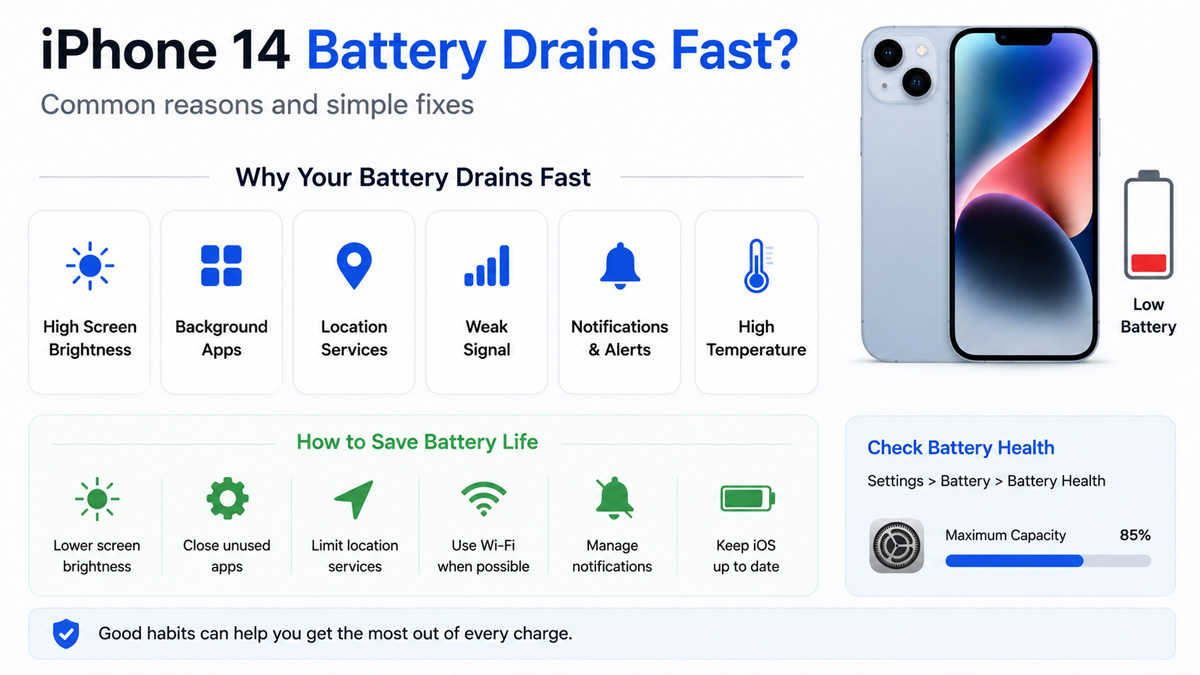
Why the iPhone 14 Battery Drains Fast
If your iPhone 14 battery is draining fast, first go to Settings > Battery and check which apps or system activities are using the most power.
Common Causes and Fixes
1. Background app activity
Some apps continue syncing, tracking location, or refreshing in the background.
Fix: Check Battery Usage and limit Background App Refresh or location access only for apps using unusually high power.
2. High screen power use
High brightness and long screen-on time can quickly reduce battery life.
Fix: Lower brightness, use Auto-Brightness, and shorten Auto-Lock. On iPhone 14 Pro models, you can also test turning off Always-On Display.
3. Weak signal or heavy 5G use
Poor reception makes the phone use more power to maintain a connection.
Fix: Use Wi-Fi when available and select 5G Auto instead of 5G On.
4. Recent iOS update
Battery drain may temporarily increase after an update while the system finishes background tasks.
Fix: Use the phone normally for a few days, then check Battery Usage again if the problem continues.
5. Battery aging
An older battery stores less energy and may drain noticeably faster.
Fix: Check Settings > Battery > Battery Health & Charging. If Maximum Capacity is close to or below 80% and daily battery life is poor, replacement may be more effective than changing settings.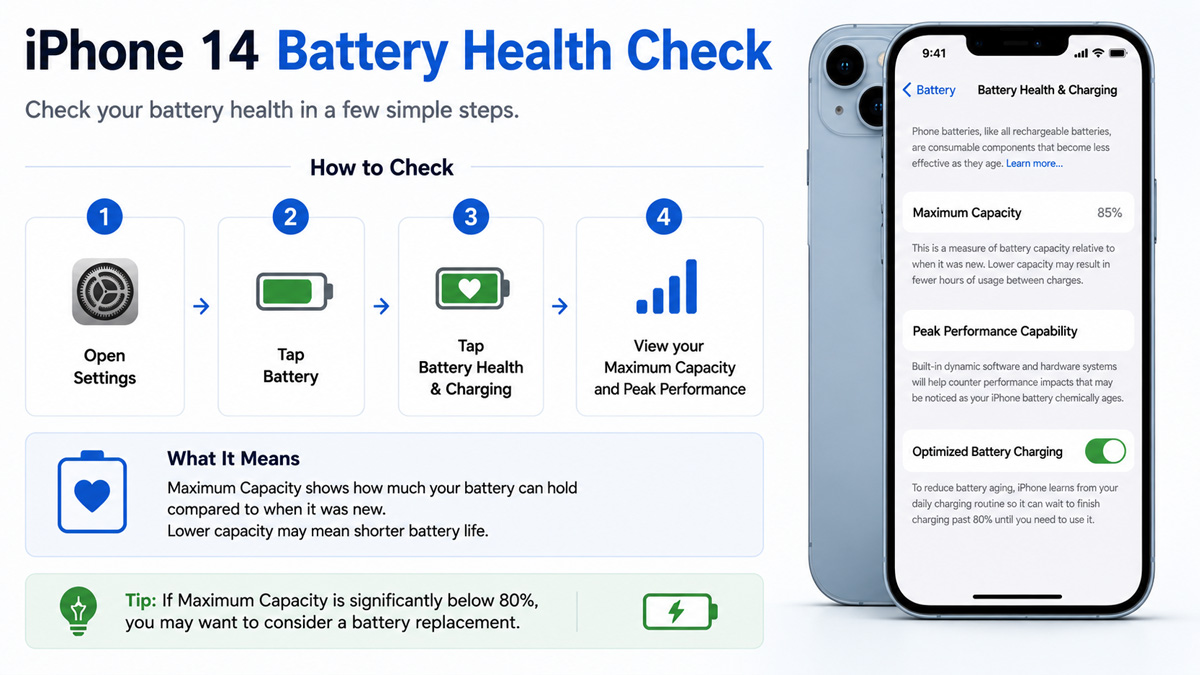
iPhone 14 Battery Health Check
You can check the condition of an iPhone 14 battery in:
Settings > Battery > Battery Health & Charging
The most important value is Maximum Capacity, which shows how much charge the battery can hold compared with when it was new.
- 90–100%: Battery condition is generally still good.
- 80–89%: Some reduction in battery life is normal.
- Around or below 80%: Battery runtime may become noticeably shorter, and replacement may be worth considering.
You should also check whether iOS shows a Service warning or other battery-related message. If battery health is low and the phone also drains quickly, shuts down unexpectedly, or needs frequent charging, the battery may be approaching the end of its useful life.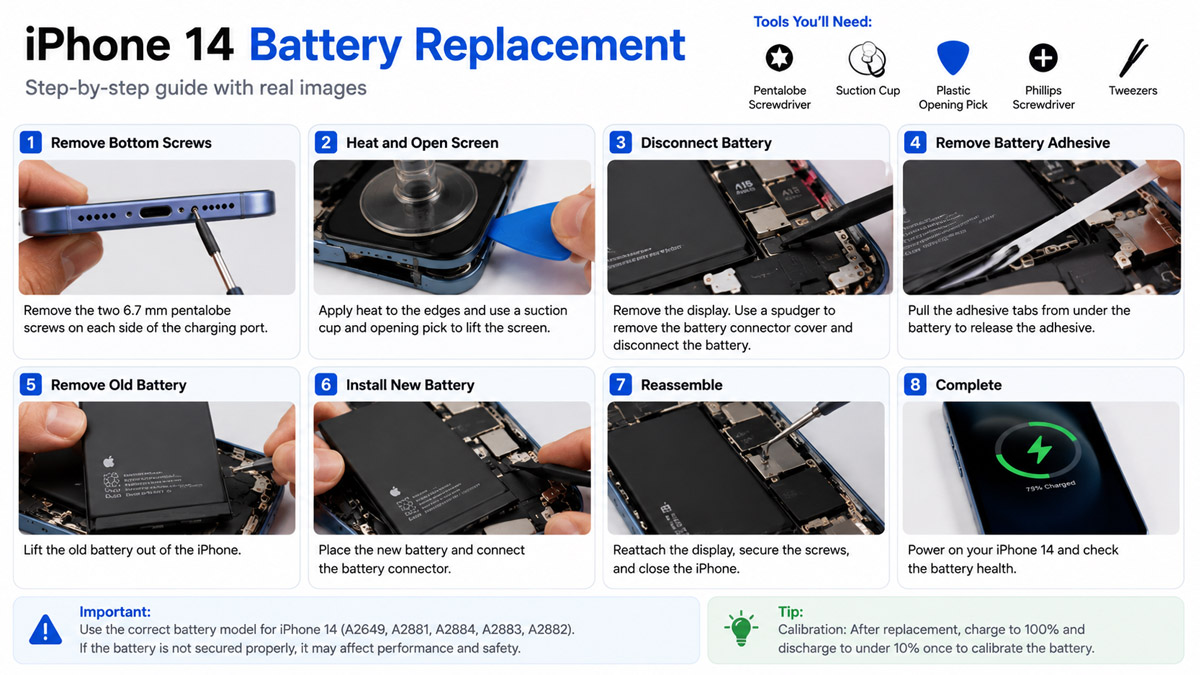
iPhone 14 Battery Replacement
An iPhone 14 battery can be replaced manually, but the process requires opening the phone, disconnecting internal components, and removing a strongly adhered battery.
• Manual Replacement Steps
1.Power off the iPhone and remove the SIM tray if applicable.
2. Remove the bottom screws near the charging port.
3. Heat the edge of the phone to soften the waterproof adhesive.
4. Carefully open the display or rear panel, depending on the iPhone 14 model.
5. Disconnect the battery connector before working on other internal components.
6. Remove the battery adhesive strips and carefully lift out the old battery.
7. Install the replacement battery and reconnect the battery connector.
8. Test the phone before fully sealing it.
9. Apply new sealing adhesive and reassemble the phone.
• Professional Replacement Is Recommended
Although DIY replacement is possible, it is easy to damage the display, flex cables, battery connector, wireless charging components, or waterproof seals while opening the phone.
Incorrect installation can also cause poor battery performance, charging problems, overheating, or reduced water resistance.
For most users, having the battery replaced by Apple or a professional repair shop is safer and usually provides a more reliable result than replacing it at home.
FAQ
How Long Does the iPhone 14 Battery Last?
In battery tests, the iPhone 14 lasted about 15 hours 23 minutes for web browsing, 8 hours 35 minutes for video streaming, and 6 hours 44 minutes for 3D gaming. Actual battery life varies with brightness, network signal, apps, temperature, and battery health.
Why Is My iPhone 14 Battery Draining So Fast?
Common causes include excessive background app activity, high screen brightness, weak cellular signal, heavy 5G use, recent iOS updates, and battery aging. Check Settings > Battery to identify what is using the most power before changing settings.
Can iPhone 14 Pro Battery Be Replaced?
Yes. The iPhone 14 Pro battery can be replaced by opening the phone and removing the internal battery. However, professional replacement is recommended because DIY repair can damage the display, internal cables, battery connector, or water-resistant seals.
How Big Is iPhone 14 Battery?
The standard iPhone 14 has a 3,279 mAh battery with 12.68 Wh of energy and a nominal voltage of 3.87 V. The iPhone 14 Plus, 14 Pro, and 14 Pro Max use different battery capacities.
How Long Does the iPhone 14 Pro Max Battery Last?
In battery tests, the iPhone 14 Pro Max lasted about 19 hours 5 minutes for web browsing, 11 hours for video streaming, and 8 hours 39 minutes for 3D gaming, giving it the strongest overall battery life among the four iPhone 14 models.


